You are here: Tools > Human Machine Interface Editor > Using the Internal Editor > Operate the Control Panel

Operate the Control Panel

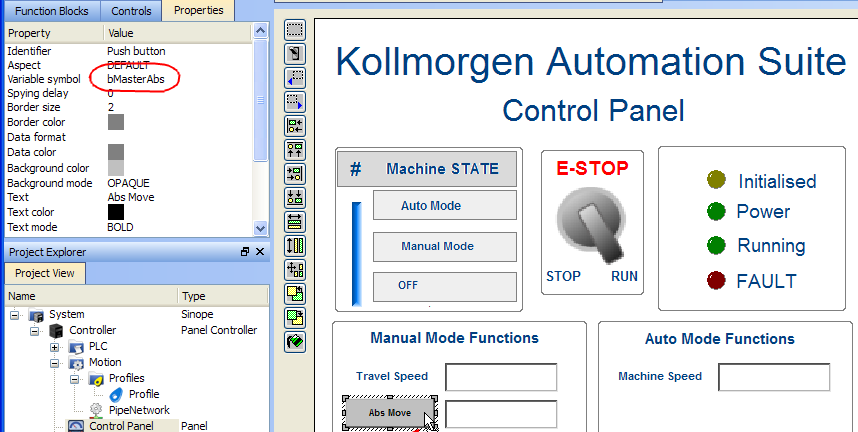
The Example program has a default control panel built-in to make it easy to start an application.

Perform the following steps to operate the control panel:

  1. Double-click on Control Panel in the Project Explorer to open the form
    Control Panel
  2. Figure 10-37: Control Panel

  3. Start by moving the vertical slider bar to select the MachineThe complete assembly of all connected parts or devices, of which at least one is movable STATE as Manual Mode
  4. In the Manual Mode Functions area, double-click the text box for the Travel Speed
  5. Enter the numeric value for the Travel Speed and press Enter

About KAS Simulator Display

The KAS Simulator displays the status and position of the axes.
It also displays the log messages.
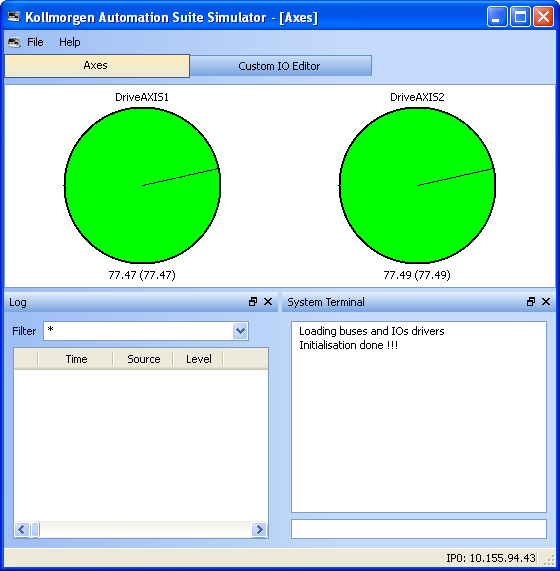
Display of Simulator

Figure 10-38: Display of KAS Simulator

You can continue to use the Control Panel to:

Exiting Simulation Mode

To exit Simulation mode, do as follows:

  1. Click the Stop Device button
  2. Click the Disconnect Device button


Stay Connected with Kollmorgen

Copyright © 2015 Kollmorgen™
